Never lose the plot again.
TableScribe listens to your game night, on Discord or around the table, and writes it all down: who said what, what happened, and a “Previously on…” for next week. It runs entirely on your own computer.
Your first two sessions are free. No card, no account. Intel Mac? Download for Intel.
Previously on…
The crystal that sings
In the smoky taproom of the Golden Griffin, the party met Maja Grå, an old woman whose crystal had begun to sing. Two glowing wolves cut the evening short. Maja revealed what it means: the crystal must reach the tower in Eldmark before the full moon, and a thief called the Ash Prince is hunting its shards. Torvald has sworn to carry it there.
- Audio never leaves your computer
- No subscription, no AI bills
- Your table's language, Swedish included
- For macOS and Windows
Every group has this conversation.
Three weeks between sessions, and the story fades. Nobody wants to be the one taking notes, so nobody does.
TableScribe takes the notes for everyone, so you can spend the first ten minutes of the night playing instead of piecing together what happened.
With TableScribe it's in last week's recap: Maja Grå, the singing crystal, the tower in Eldmark, and Torvald carrying it there.
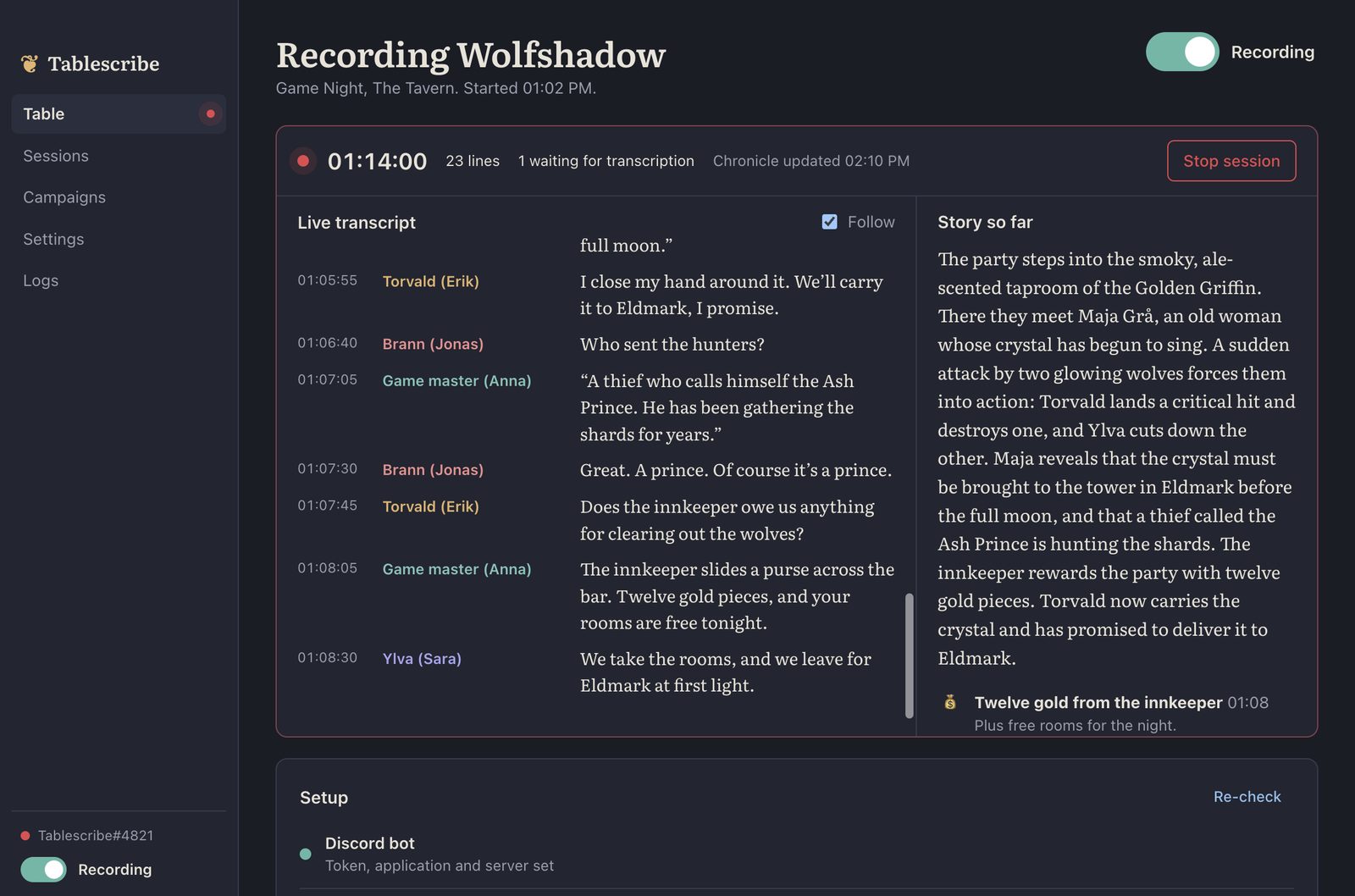
From voice chat to recap, while you play.
-
1
Listen
On Discord, each player arrives as their own audio stream. At the table, TableScribe tells voices apart by how they sound.
-
2
Transcribe
Whisper turns speech into text on your computer. Swedish tables get KB-Whisper, trained by the National Library of Sweden on 50,000 hours of Swedish speech.
-
3
Chronicle
Every 15 minutes a local language model folds the latest talk into the story so far. Snack orders and rules debates are left out.
-
4
Recap
Stop the session and get an episode title, a “Previously on…” to read aloud, and the full story of the night.
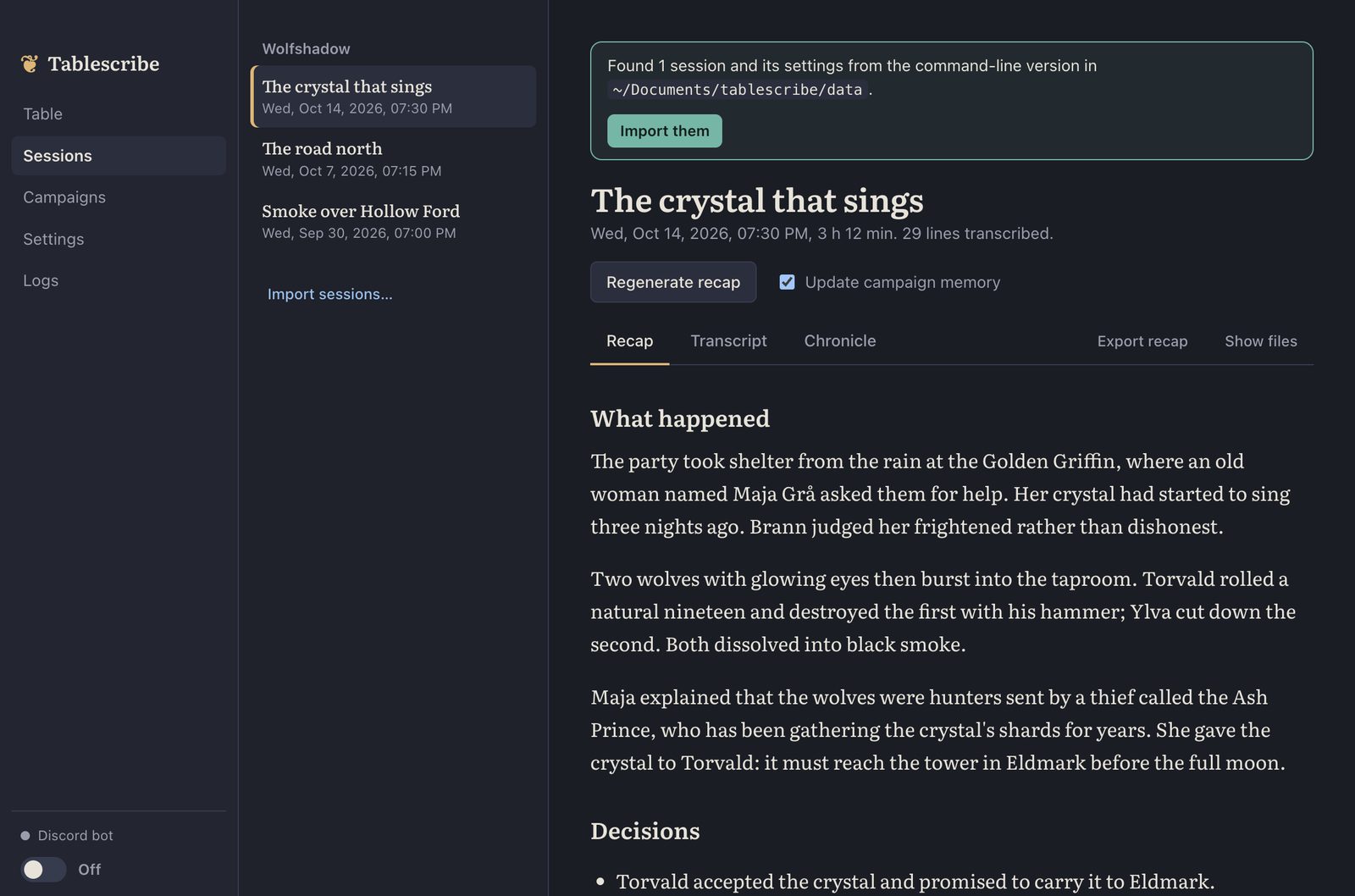
A recap your GM can read aloud
Every session ends with an episode title and a dramatic “Previously on…”, followed by the whole story: decisions, combat highlights, the people you met, the loot you found and the threads still hanging.
On Discord it's posted straight to your channel, with the recap and transcript attached.
Every word, with who said it
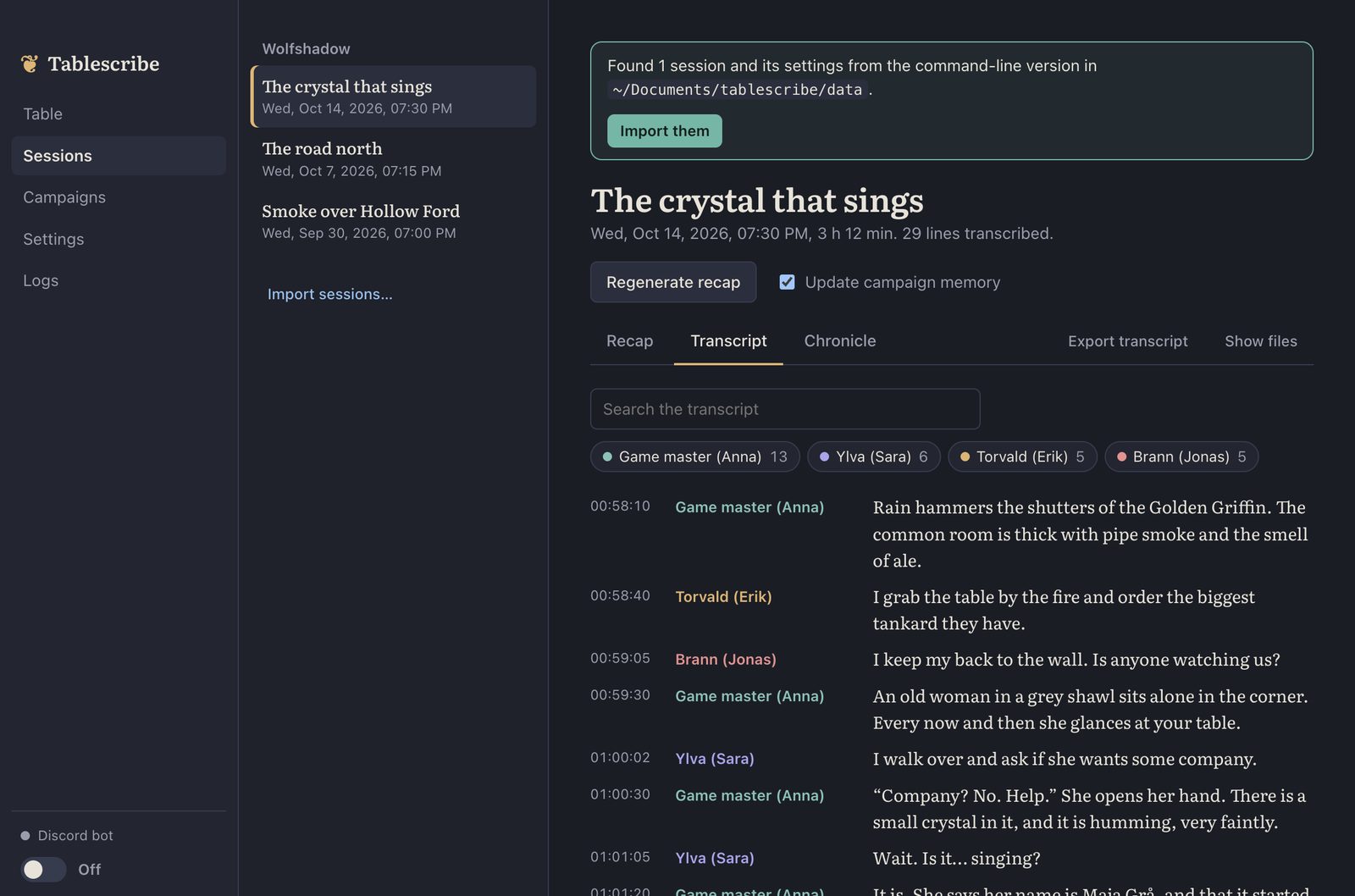
The full transcript is searchable, with one colour per speaker. Label players with their characters, mark the GM, and the recap treats the GM's narration as canon.
At the table, name a voice once and TableScribe recognises it next week.
Wolfshadow
What the campaign remembers after session 12
Person
Maja Grå
Keeper of the singing crystal
Place
The tower in Eldmark
Where the crystal must go
Person
The Ash Prince
Hunting the shards
Open quest
The crystal to Eldmark
Before the full moon
It remembers the whole campaign
People, places, quests, loot and a summary of every session carry over from week to week, so each recap knows the story so far.
Keep notes in Obsidian? Export the campaign to your vault, with a page for every session, person, place and quest, all linked.
Made for game night, not for the cloud.
Private by default
Audio, transcripts and recaps stay on your computer. Cloud transcription is there if you ever want it, and off unless you turn it on.
Nothing to pay per session
No API keys and no AI subscription. Once it's installed, a four-hour session costs nothing but electricity.
Nothing else to install
Speech recognition is built in, and so is the story model's engine on a Mac. The rest is a click in the setup checklist.
Learns your names
Names it picks up are fed back to the speech recognition, so your invented places stop getting mangled after the first hour.
Survives a rough night
Every line is saved as it's spoken. If Discord drops the call, the bot rejoins and carries on with the same transcript.
Already recorded it?
Import a phone voice memo, a Zoom or Teams recording, or a per-player Craig recording and get the same transcript and recap.
Ready before your next session.
Everything TableScribe needs comes built in or one click away: no terminal, no extra installs. Tell us how you play and we'll walk you through it.
Let's begin
Your setup
Two quick choices, and the guide shows only the steps you need. You can come back and change them any time.
Your computer
How do you play?
- Download TableScribe for macOS.
- Open the disk image and drag TableScribe into your Applications folder.
- Open TableScribe from Applications.
- Download TableScribe for Windows.
- Run the installer and follow its steps.
- Open TableScribe from the Start menu or the desktop shortcut.
In TableScribe, open Settings and set Your table speaks. Then go to the Table view: its Setup list shows what's still missing, each with a button that fixes it.
- Speech model — click Download. Swedish tables get KB-Whisper; other languages get Whisper turbo.
- Story model — click Download model. Ollama, which runs it, is built into TableScribe.
- Speech model — click Download. Swedish tables get KB-Whisper medium, sized to keep up on the processor; other languages get Whisper turbo.
- Ollama — click Download Ollama. It runs the story model. Already have the Ollama app? Start it and press Re-check instead.
- Story model — then click Download model.
Speech recognition is built in. The downloads take a while the first time, and you only do this once.
TableScribe uses its own bot for your group. You need a Discord server where you're allowed to add bots.
- Open the Discord Developer Portal, click New Application and give it a name, such as “Scribe”.
- In the Bot tab, click Reset Token and copy the token. No privileged intents are needed.
- In General Information, copy the Application ID.
Keep the token somewhere safe for the next few minutes: you'll paste it into TableScribe shortly.
Still in the Developer Portal, open OAuth2 → URL Generator and tick:
Scopes
botapplications.commands
Permissions
View Channels, Send Messages, Embed Links, Attach Files, Connect
Open the generated link and choose your server.
In TableScribe's Settings, paste:
- Bot token — kept in your system keychain
- Application ID
- Server ID — turn on Developer Mode in Discord (User Settings → Advanced), then right-click your server and choose Copy Server ID
The Server ID makes the slash commands show up in your server straight away.
Flip the switch at the top of the Table view. The bot comes online in your server, and TableScribe keeps the computer awake while it's on.
Closing the window is fine: the bot keeps running from its icon in the menu bar.
Closing the window is fine: the bot keeps running from its icon in the system tray, by the clock.
Getting character names right is the single biggest boost for both the transcript and the recap. Do this once, in any text channel:
/character set name:Torvald player:@Eriklabel a player with their character/character gm player:@Annamark the game master/glossary add words:Eldmark, Ash Princenames and terms to spell rightJoin your voice channel, then:
/session start campaign:Wolfshadowstart recording; the campaign name keeps its memory separate/recapsee the story so far mid-session/session stopend the session and post the recapForgot to stop? The session ends and is summarised by itself once the voice channel has been empty for 10 minutes.
One microphone hears everyone at once, so TableScribe tells voices apart by how they sound. Click Download next to Speaker recognition in the Setup list.
Voices are easiest to tell apart when everyone sounds about as loud.
Works best
A USB conference speakerphone or a boundary microphone in the middle of the table
Works, but less well
A laptop's built-in microphone at one end, where the far side of the table sounds quieter
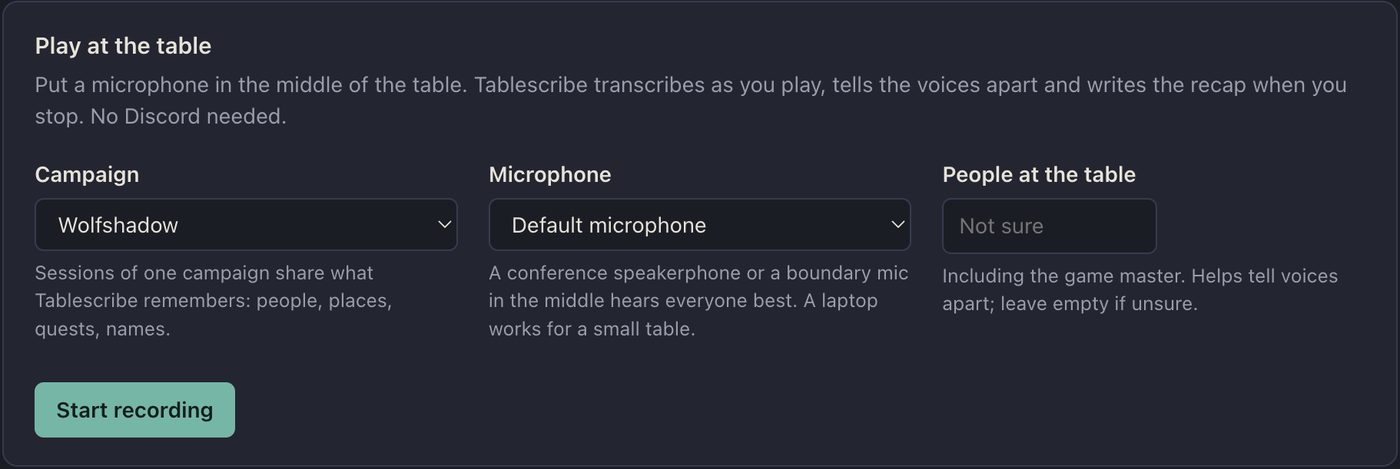
On the Table view, pick a campaign and the microphone, say how many people are playing if you like (it helps), and press Start recording. The live transcript and the story so far fill in as you play.
Press Stop session when you're done. TableScribe sorts the voices over the whole evening and writes the recap: an episode title, a “Previously on…” to read next time, and the full story of the night.
You'll find it under Sessions, with the transcript beside it.
Two small extras in the Table view's Setup list:
- ffmpeg — click Download ffmpeg. It reads audio and video files.
- Speaker recognition — click Download (28 MB). It tells voices apart when everyone is on one recording.
Choose Import a recording… and pick what you have. It's transcribed, the voices are told apart and the recap is written, the same as a live session.
The whole table in one file
A phone voice memo, Zoom, Teams or OBS: m4a, mp3, wav, mp4 and more
The same, in several parts
Pick all the parts, then choose Parts of one recording
One track per player
A Craig zip or a multitrack recorder: every file is one person, named after the file
The first time, voices are numbered as they're heard. In the transcript, press ✎ next to “Speaker 2” and say who it is, plus their character or that they're the GM. Then regenerate the recap.
Two people came out as one speaker, or one person as two? Adjust How alike two voices must sound under Settings → In person & recordings.
That's it. Enjoy the game, and let TableScribe keep the notes.
Tell your group. Make sure everyone is happy to be recorded and transcribed before you start. The bot announces itself, anyone who leaves the voice channel isn't recorded, and music bots are ignored automatically.
Play another way too?
More memory, better recaps
Speech recognition and the story model share your computer's memory. The bigger the model you can run, the better it follows the plot.
Apple Silicon Macs transcribe many times faster than real time. On Windows, speech runs on the processor, so Swedish tables get the medium KB-Whisper model, which still keeps up with a full table.
| Memory | Story model | What to expect |
|---|---|---|
| 8 GB | A small multilingual model | Works, but tight. Summarise at the end of the night instead of every 15 minutes. |
| 16 GB | gemma4:12b |
Recommended. Solid recaps of what happened, who you met and what you found. |
| 32 GB or more | gemma4:26b |
Noticeably better at following the story, and still quick. |
Pay once. Play for as long as you like.
No subscription, and nothing that renews by itself. Try it on two real sessions first.
Free trial
€0
Two sessions per computer
Every feature, on two real game nights. No card and no account needed.
Download3-month pass
€6.95
About 53 cents a week if you play weekly
One payment that doesn't renew. Buy again with the same email and it extends the same key.
Buy the 3-month passForever license
€49.95
Once, for good
Yours for every campaign to come. Already on a 3-month pass? Upgrading keeps your key.
Buy the forever licenseEvery key works on two computers at a time, and you can move it from either one. Payments are handled securely by Paddle.
Questions before you roll
Does my group's audio leave my computer?
No. Transcription and recaps run on your computer by default. Only if you switch on cloud transcription in Settings is audio sent, and then only to the service you choose.
Which languages does it understand?
Any language Whisper knows, with a model made for Swedish. The bot's own Discord messages are in English or Swedish, and you can have recaps written in another language than the one you play in.
How good are the recaps?
You get a reliable record of what happened, who you met and what you found. The prose is plainer than a large cloud model's, and bigger local models do better. The full transcript is always there too.
We play in person. Does it still work?
Yes. Put one microphone in the middle of the table and press Start recording. TableScribe tells voices apart by how they sound, and remembers them once you've named them.
Does the computer have to stay on?
Yes, for the whole session, and TableScribe keeps it awake for you. On Discord, the computer running it doesn't need to be in the call.
What about the music bot in our channel?
Bots are skipped automatically. You can also leave any speaker out of a recap afterwards by clicking their name in Sessions.